How to Display Ratings and Reviews in Google’s Organic Search Results

By Maria Rynning
February 7, 2025

Table Of Contents

Trust is a decisive factor in a consumer’s buying journey. Studies show that products with ratings in Google Search can increase click-through rates (CTR) by up to 35% (Source: BrightLocal, 2024). When star ratings appear in search results, they immediately signal credibility, offering potential buyers valuable insights before they even visit your website.

For eCommerce businesses, properly implementing structured data and ensuring that reviews are indexed correctly can significantly enhance organic traffic, visibility, and conversions. However, many retailers struggle with ensuring that Google correctly displays their product ratings.

This guide will walk you through the process of verifying, troubleshooting, and optimizing your ratings to appear in Google’s organic search results using Lipscore’s rating widget and structured data.

👉 Not sure if your ratings are appearing? Run a quick Google search for one of your products and check if the star ratings are visible. If they’re missing, keep reading to find out why.

How to Verify That Ratings and Reviews Appear in Google Search

Before diving into troubleshooting, it’s essential to confirm whether your ratings are displaying correctly. Follow these steps:

1. Search for Your Product on Google

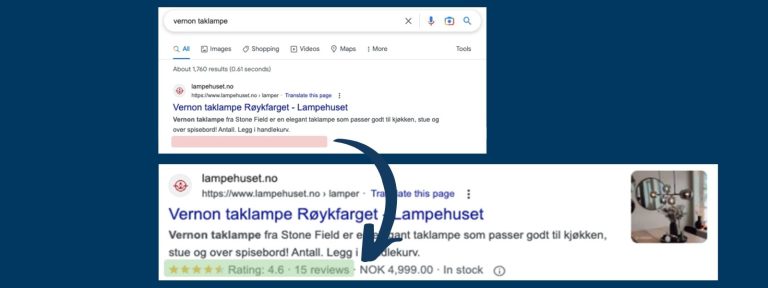
  • Perform a Google search for your product name and check whether a star rating appears beneath the meta description in search results.
  • If your product has at least 15 ratings, it should be eligible to appear with a rating.

2. Check Google Search Console for Structured Data Errors

  • Log in to Google Search Console and navigate to Enhancements > Product Structured Data.
  • Review any errors or warnings related to missing or incorrect schema markup.

3. Validate Your Page with Google’s Rich Results Test

  • Visit Google’s Rich Results Test.
  • Enter your product page URL and run the test.
  • If ratings aren’t detected, your structured data might be incomplete.

💡 Tip: If your reviews aren’t showing up despite correct implementation, Google may take several weeks to index new data. Be patient, and ensure your structured data remains consistent.

Why Might Ratings Not Appear in Google Search?

Google uses Rich Snippets to display ratings, but several factors can prevent them from showing. Below are the most common issues:

1. Incomplete or Incorrect Schema Markup

Google requires structured data to be formatted correctly using schema.org markup. If your schema lacks required properties (e.g., rating count, review count), it won’t be eligible for rich snippets.

2. GTIN or Product Identifiers Are Missing

  • Google relies on Global Trade Item Numbers (GTINs) to match products across different platforms.
  • If your products don’t have GTINs, an alternative method (like custom SKUs) must be used.

3. Lipscore Rating Widget Is Not Implemented

  • The Lipscore-rating widget must be embedded on product pages to collect and display verified reviews.
  • If the widget is missing, ratings may not appear in search results.

4. Google Hasn’t Indexed Your Updates Yet

  • Even if your structured data is correct, Google does not display ratings instantly.
  • It can take up to 4 weeks for Google to recognize and apply review data.

Steps to Ensure Your Ratings Display Correctly

If your product ratings aren’t showing up, follow these steps to troubleshoot and resolve the issue.

1. Verify Your Schema Markup

  • Ensure that your product page includes Product, AggregateRating, and Review schema.
  • Add required fields:
    • "@type": "Product"
    • "name": "Product Name"
    • "aggregateRating": { "@type": "AggregateRating", "ratingValue": "4.5", "reviewCount": "125" }

2. Ensure Lipscore is Properly Implemented

  • The Lipscore-rating widget must be live on your product pages.
  • The widget contains necessary schema markup that Google recognizes for displaying reviews.

3. Submit Your Pages for Reindexing

  • Use Google Search Console to submit updated product URLs for re-crawling.
  • Run the URL Inspection Tool to confirm schema validation.

4. Check Google’s Policies

  • Ensure that your website complies with Google’s structured data guidelines.
  • Avoid manipulative practices such as review gating (only allowing positive reviews) or incentivized reviews.

Case Study: Lampehuset’s Success in Displaying Ratings

Challenge

Lampehuset, a leading retailer in lighting solutions, struggled with missing structured data and unlinked GTINs, preventing their product ratings from appearing in search results.

Solution

By working with Fullstakk and Lipscore, Lampehuset:

  • Implemented correct schema markup with the Lipscore widget.
  • Integrated Metamanager to link product identifiers with review data.
  • Submitted updated structured data to Google Merchant Center for validation.

Results

  • 416% increase in organic search traffic.
  • 410% more products appearing on the first search page.
  • 540% more organic impressions in Google Search.

Takeaway: Properly implemented structured data and review aggregation significantly improves SEO performance.

Metamanager: Simplifying Structured Data for Lipscore Users

If your eCommerce store lacks GTINs or struggles with structured data integration, Metamanager is a game-changing solution. Here’s how it works:

  • Matches your GTIN, SKU, or custom product ID with Lipscore’s verified ratings.
  • Generates custom XML feeds for seamless integration with Google Merchant Center.
  • Ensures consistent, high-quality structured data for maximum visibility.

👉 Want to streamline your structured data setup? Contact us to learn more about Metamanager.

Interested in Metamanager? Contact us for more information.

Unlock the Full SEO Potential of Lipscore with Fullstakk

Are you maximizing the SEO value of your customer reviews and ratings collected via Lipscore? Order a FREE SEO ANALYSIS today. Fullstakk will provide tailor-made SEO solutions for:

  • Enhancing organic search visibility
  • Boosting performance in Google Ads / Shopping
  • Optimizing the design and placement of the Lipscore widget for better conversion rates

Get Your FREE SEO ANALYSIS Today!

Complete the contact form below and specify that you wish to receive a Free SEO Analysis from Fullstakk.

Real Reviews Update.

Monthly updates with product news, best practices, and inspiration to grow your business.

See Real Reviews™ by Lipscore in action.

Discover how Lipscore helps you:

  • Get more ratings and verified reviews through high response rates
  • Increase visibility in Google and AI-powered search
  • Build trust that boosts conversions and sales
  • Scale globally with automatic review translations

Get more verified customer feedback than you ever thought possible.

Book a demo to see how - no commitments, just valuable insights.

Get the latest news, tips & resources.

Straight to your inbox monthly.